Part One ended with a schema on paper. This part builds it and queries it. The dialect throughout is MySQL, so where MySQL lacks an operator (FULL JOIN, INTERSECT, MINUS) you will see how to emulate it.
What SQL is
- SQL, Structured Query Language, is used to access and manipulate data.
- SQL is not a database. It is a query language.
- SQL talks to the database through CRUD operations:
- Create: run INSERT statements to add new tuples to a relation.
- Read: read data already in the relations.
- Update: modify data already inserted.
- Delete: remove a specific tuple, or several.
What is an RDBMS? A relational database management system is software that lets you implement a relational model you have designed. MySQL, MS SQL Server, Oracle and IBM Db2 are examples. In a relational database the table (relation) is the simplest storage object. MySQL is an open-source RDBMS and uses SQL for all CRUD operations.
MySQL uses a client-server model: the client is a CLI or front end that uses the services the MySQL server provides.
SQL vs MySQL. SQL is the language you use to perform CRUD operations on a relational database. MySQL is an RDBMS: it stores, manages and administers databases, and you talk to it in SQL.
SQL data types
String types
| Data type | Description |
|---|---|
| CHAR(size) | Fixed-length string of letters, numbers and special characters. Length 0 to 255, default 1. |
| VARCHAR(size) | Variable-length string of letters, numbers and special characters. Max length 0 to 65,535. |
| BINARY(size) | Fixed-length binary byte string. Length in bytes, default 1. |
| VARBINARY(size) | Variable-length binary byte string. Max length in bytes. |
| TINYBLOB | Binary large object (BLOB), max 255 bytes. |
| TINYTEXT | String, max 255 characters. |
| TEXT(size) | String, max 65,535 bytes. |
| BLOB(size) | BLOB, max 65,535 bytes. |
| MEDIUMTEXT | String, max 16,777,215 characters. |
| MEDIUMBLOB | BLOB, max 16,777,215 bytes. |
| LONGTEXT | String, max 4,294,967,295 characters. |
| LONGBLOB | BLOB, max 4,294,967,295 bytes. |
| ENUM(val1, val2, val3, …) | One value from a list of up to 65,535. A value not in the list is stored as a blank. |
| SET(val1, val2, val3, …) | Zero or more values from a list of up to 64. |
Numeric types
| Data type | Description |
|---|---|
| BIT(size) | Bit-value type; size is bits per value, 1 to 64, default 1. |
| TINYINT(size) | Very small integer. Signed -128 to 127, unsigned 0 to 255. Max display width 255. |
| BOOL / BOOLEAN | Zero is false, non-zero is true. |
| SMALLINT(size) | Small integer. Signed -32,768 to 32,767, unsigned 0 to 65,535. Max display width 255. |
| MEDIUMINT(size) | Medium integer. Signed -8,388,608 to 8,388,607, unsigned 0 to 16,777,215. Max display width 255. |
| INT(size) / INTEGER(size) | Integer. Signed -2,147,483,648 to 2,147,483,647, unsigned 0 to 4,294,967,295. Max display width 255. |
| BIGINT(size) | Large integer. Signed -9,223,372,036,854,775,808 to 9,223,372,036,854,775,807, unsigned 0 to 18,446,744,073,709,551,615. Max display width 255. |
| FLOAT(size, d) | Floating point; size is total digits, d is digits after the decimal point. Deprecated in MySQL 8.0.17. |
| FLOAT(p) | Floating point; p decides the type: 0 to 24 gives FLOAT, 25 to 53 gives DOUBLE. |
| DOUBLE(size, d) / DOUBLE PRECISION(size, d) | Normal-size floating point; size is total digits, d is digits after the decimal point. |
| DECIMAL(size, d) / DEC(size, d) | Exact fixed-point number. Max size 65, max d 30; defaults 10 and 0. |
Numeric types can take UNSIGNED or ZEROFILL. UNSIGNED disallows negative values. ZEROFILL
pads the displayed value with zeros, and MySQL adds UNSIGNED along with it.
Date and time types
| Data type | Description |
|---|---|
| DATE | YYYY-MM-DD. Range ‘1000-01-01’ to ‘9999-12-31’. |
| DATETIME(fsp) | YYYY-MM-DD hh:mm:ss. Range ‘1000-01-01 00:00:00’ to ‘9999-12-31 23:59:59’. |
| TIMESTAMP(fsp) | Stored as seconds since the Unix epoch (‘1970-01-01 00:00:00’ UTC), shown as YYYY-MM-DD hh:mm:ss. Range ‘1970-01-01 00:00:01’ UTC to ‘2038-01-19 03:14:07’ UTC. |
| TIME(fsp) | hh:mm:ss. Range ‘-838:59:59’ to ‘838:59:59’. |
| YEAR | Four-digit year. Values 1901 to 2155, and 0000. MySQL 8.0 does not support two-digit years. |
JSON
MySQL’s JSON type stores structured data in JSON (JavaScript Object Notation) format, so nested
structures can be stored as-is and queried with JSON-specific functions.
CREATE TABLE my_table (
    id INT PRIMARY KEY,
    data JSON
);

INSERT INTO my_table (id, data) VALUES (1, '{"name": "John", "age": 30}');
Types of SQL command
- DDL (data definition language) defines the relation schema.
CREATE: create tables, databases and views.ALTER TABLE: change a table’s structure, such as a column’s type, or add and remove columns.DROP: delete tables, databases and views.TRUNCATE: remove all tuples from a table.RENAME: rename databases, tables, columns and so on.
- DRL/DQL (data retrieval / data query language) retrieves data from tables.
SELECT
- DML (data modification language) changes the data.
INSERT: add data to a relation.UPDATE: change data in a relation.DELETE: remove rows from a relation.
- DCL (data control language) grants and revokes permissions.
GRANT: give access privileges on the database.REVOKE: take them away.
- TCL (transaction control language) manages transactions.
START TRANSACTION: begin a transaction.COMMIT: apply all changes and end the transaction.ROLLBACK: discard the changes and end the transaction.SAVEPOINT: set a checkpoint inside a transaction that you can roll back to.
Managing databases (DDL)
CREATE DATABASE IF NOT EXISTS db_name;
USE db_name; -- pick the database that later CREATE TABLE etc. run against; this is how you switch between databases
DROP DATABASE IF EXISTS db_name;
SHOW DATABASES; -- list every database on the server
SHOW TABLES; -- list the tables in the selected database
Retrieving data (DRL)
SELECT
SELECT <set of column names> FROM <table_name>;
Although you write SELECT first, it is evaluated after FROM: the database first finds the
table, then picks the columns. Read the statement right to left to follow the order of execution.
Can you use SELECT without FROM? Yes, through the DUAL table: a dummy table MySQL provides
so you can compute things without referring to a table of your own.
SELECT 55 + 11;          -- returns the sum
SELECT now();            -- returns the current timestamp
SELECT ucase('heLLo');   -- returns HELLO
WHERE
Filters rows by a condition.
SELECT * FROM customer WHERE age > 18;
BETWEEN
SELECT * FROM customer WHERE age BETWEEN 0 AND 100;
Both ends, 0 and 100, are included.
IN
Replaces a chain of OR conditions.
SELECT * FROM officers WHERE officer_name IN ('Lakshay', 'Maharana Pratap', 'Deepika');
AND, OR, NOT
- AND:
WHERE cond1 AND cond2 - OR:
WHERE cond1 OR cond2 - NOT:
WHERE col_name NOT IN (1, 2, 3, 4)
IS NULL
SELECT * FROM customer WHERE prime_status IS NULL;
Pattern matching with wildcards
%matches any number of characters, zero or more, like*in a glob._matches exactly one character.
SELECT * FROM customer WHERE name LIKE '%p_';
This returns customers whose name has p as its second-to-last character: anything, then p,
then one more character.
ORDER BY
- Sorts the rows the query returns.
ORDER BY <column-name> DESC, whereDESCis descending andASCascending (the default).
SELECT * FROM customer WHERE name LIKE 'A%' ORDER BY name DESC;
GROUP BY
- Collects rows that share values in one or more columns into groups, one result row per group.
It is used with
SELECT.
SELECT c1, c2, c3 FROM sample_table WHERE cond GROUP BY c1, c2, c3;
- Every column in the
SELECTlist that is not inside an aggregate function has to appear inGROUP BYfor the query to run. - It is used with aggregate functions:
COUNT()-
AVG()-- average salary per department SELECT department, AVG(salary) FROM worker GROUP BY department; -
MIN()-- lowest salary per department SELECT department, MIN(salary) FROM worker GROUP BY department; MAX()-
SUM()-- total salary per department SELECT department, SUM(salary) FROM worker GROUP BY department;
DISTINCT
Returns the distinct values of a column.
SELECT DISTINCT(col_name) FROM table_name;
GROUP BY does the same thing:
SELECT col_name FROM table_name GROUP BY col_name;
The output matches the DISTINCT query. With GROUP BY and no aggregate function, SQL treats it
as a request for distinct values.
GROUP BY … HAVING
Out of the groups GROUP BY makes, HAVING keeps only the ones that meet a condition. It is the
WHERE of groups.
SELECT COUNT(cust_id), country FROM customer GROUP BY country HAVING COUNT(cust_id) > 50;
WHERE vs HAVING
- Both filter rows by a condition.
WHEREfilters rows of the table.HAVINGfilters the groups.WHEREcomes beforeGROUP BY;HAVINGcomes after it.HAVINGneeds aGROUP BY.WHEREworks withSELECT,UPDATEandDELETE;HAVINGonly withSELECT.
Constraints (DDL)
Primary key
Not NULL, unique, and only one per table.
CREATE TABLE customer (
    id INT PRIMARY KEY,
    branch_id INT,
    first_name CHAR(50),
    last_name CHAR(50),
    dob DATE,
    gender CHAR(6)
    -- or declare it separately: PRIMARY KEY (id)
);
Foreign key
- References the PK of another table.
- A relation can have any number of FKs.
CREATE TABLE orders (
    id INT PRIMARY KEY,
    delivery_date DATE,
    order_placed_date DATE,
    cust_id INT,
    FOREIGN KEY (cust_id) REFERENCES customer(id)
);
An attribute can be both a PK and an FK in the same table.
UNIQUE
Unique, may be NULL, and a table can have several unique columns.
CREATE TABLE customer (
    ...
    email VARCHAR(1024) UNIQUE,
    ...
);
CHECK
CREATE TABLE customer (
    ...
    CONSTRAINT age_check CHECK (age > 12),
    ...
);
Naming the constraint (age_check) is optional in MySQL; it generates a name if you leave it out.
DEFAULT
Sets a column’s default value.
CREATE TABLE account (
    ...
    saving_rate DOUBLE NOT NULL DEFAULT 4.25,
    ...
);
ALTER
ALTER changes the schema.
ADD a new column:
ALTER TABLE table_name ADD new_col_name datatype, ADD new_col_name_2 datatype;
ALTER TABLE customer ADD age INT NOT NULL;
MODIFY a column’s data type:
ALTER TABLE table_name MODIFY col_name col_datatype;
-- VARCHAR to CHAR
ALTER TABLE customer MODIFY name CHAR(1024);
CHANGE COLUMN to rename a column:
ALTER TABLE table_name CHANGE COLUMN old_col_name new_col_name new_col_datatype;
ALTER TABLE customer CHANGE COLUMN name customer_name VARCHAR(1024);
DROP COLUMN to remove a column:
ALTER TABLE table_name DROP COLUMN col_name;
ALTER TABLE customer DROP COLUMN middle_name;
RENAME the table itself:
ALTER TABLE table_name RENAME TO new_table_name;
ALTER TABLE customer RENAME TO customer_details;
Changing data (DML)
INSERT
INSERT INTO table_name (col1, col2, col3) VALUES (v1, v2, v3), (val1, val2, val3);
UPDATE
UPDATE table_name SET col1 = 1, col2 = 'abc' WHERE id = 1;
Update every row at once:
UPDATE student SET standard = standard + 1;
ON UPDATE CASCADE is declared on the foreign key when you create the constraint. Say one
table’s PK is another table’s FK. If the PK value in the first table changes, ON UPDATE CASCADE
changes the matching FK values in the second table to follow.
DELETE
DELETE FROM table_name WHERE id = 1;
DELETE FROM table_name; -- deletes every row
ON DELETE CASCADE gets around the deletion constraint from Part One. What happens to child rows when the parent row is deleted? With this, they are deleted too.
CREATE TABLE orders (
    order_id INT PRIMARY KEY,
    delivery_date DATE,
    cust_id INT,
    FOREIGN KEY (cust_id) REFERENCES customer(id) ON DELETE CASCADE
);
ON DELETE SET NULL answers “can an FK be NULL?” It can: the child rows stay and their FK is set to NULL.
CREATE TABLE orders (
    order_id INT PRIMARY KEY,
    delivery_date DATE,
    cust_id INT,
    FOREIGN KEY (cust_id) REFERENCES customer(id) ON DELETE SET NULL
);
REPLACE
- Mostly used on tuples that already exist.
- If a row with the same PK (or unique key) exists, it is replaced, which works like an
UPDATE. - If there is no such row, a new tuple is inserted, like an
INSERT.
REPLACE INTO student (id, class) VALUES (4, 3);
REPLACE INTO table_name SET col1 = val1, col2 = val2;
Joining tables
- An RDBMS is relational by nature: to get a useful answer you usually read from more than one table.
- Foreign keys are what one table uses to point at another.
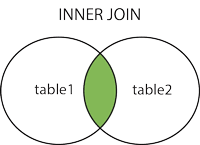
INNER JOIN
Returns the rows that have matching values in both tables (or all the tables joined).
SELECT column_list FROM table1
INNER JOIN table2 ON condition1
INNER JOIN table3 ON condition2
...;
Aliases (AS). An alias gives a table or column a temporary name for one query, a nickname that keeps the query short and readable.
SELECT col_name AS alias_name FROM table_name;
SELECT col_name1, col_name2, ... FROM table_name AS alias_name;
OUTER JOIN
LEFT JOIN returns every row of the left table, plus the matching rows of the right table.
SELECT columns FROM table1 LEFT JOIN table2 ON join_cond;
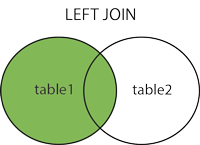
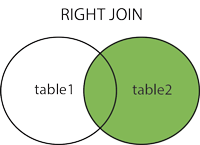
RIGHT JOIN returns every row of the right table, plus the matching rows of the left table.
SELECT columns FROM table1 RIGHT JOIN table2 ON join_cond;
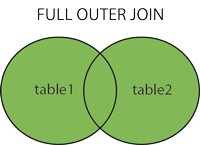
FULL JOIN returns every row from both tables, matched where a match exists. MySQL has no
FULL JOIN, so you emulate it as LEFT JOIN UNION RIGHT JOIN:
SELECT columns FROM table1 AS t1 LEFT JOIN table2 AS t2 ON t1.id = t2.id
UNION
SELECT columns FROM table1 AS t1 RIGHT JOIN table2 AS t2 ON t1.id = t2.id;
UNION removes duplicate rows; use UNION ALL to keep them.
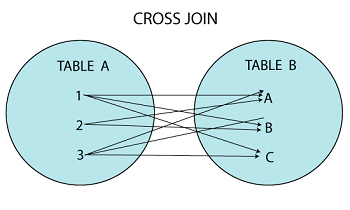
CROSS JOIN
- Returns the Cartesian product of the two tables: every row of one paired with every row of the other.
- Rarely used in practice.
- If table 1 has 10 rows and table 2 has 5, the result has 50.
SELECT column_list FROM table1 CROSS JOIN table2;
SELF JOIN
- A table joined to itself.
- Not used often.
- Written as an
INNER JOINof the table with a second alias of itself.
SELECT columns FROM table_name AS t1 INNER JOIN table_name AS t2 ON t1.id = t2.id;

Joining without the JOIN keyword
SELECT * FROM table1, table2 WHERE condition;
SELECT artist_name, album_name, year_recorded
FROM artist, album
WHERE artist.id = album.artist_id;
Set operations
- Combine the results of several
SELECTstatements. - Always return distinct rows (the
ALLvariants aside).
| JOIN | Set operations |
|---|---|
| Combines tables based on a matching condition. | Combines the result sets of two or more SELECT statements. |
| Column-wise combination. | Row-wise combination. |
| Data types of the two tables can differ. | Corresponding columns must have the same data type. |
| Can return distinct or duplicate rows. | Returns distinct rows. |
| The number of columns selected from each table can differ. | Each SELECT must select the same number of columns. |
| Combines results horizontally. | Combines results vertically. |
UNION
Combines the results of two or more SELECT statements.
SELECT * FROM table1
UNION
SELECT * FROM table2;
Both SELECTs must have the same number of columns, in the same order.
INTERSECT
Returns the rows common to both. MySQL has no INTERSECT (before 8.0.31), so emulate it:
SELECT DISTINCT column_list FROM table1 INNER JOIN table2 USING (join_col);
SELECT DISTINCT * FROM table1 INNER JOIN table2 USING (id);
MINUS
Returns the distinct rows of the first table that do not appear in the second. Also emulated:
SELECT column_list FROM table1 LEFT JOIN table2 ON condition WHERE table2.column_name IS NULL;
SELECT id FROM table_1 LEFT JOIN table_2 USING (id) WHERE table_2.id IS NULL;
Subqueries
A subquery is a query nested inside another, often an alternative to a join. The outer query depends on the result of the inner one.
flowchart LR
    Inner["Inner query (subquery)<br/>SELECT … FROM table2 WHERE …"] -->|result feeds| Outer["Outer query (parent)<br/>SELECT … WHERE col IN ( … )"]
    classDef flow    fill:#F1F5F9,stroke:#475569,color:#0F172A,stroke-width:2px
    classDef gateway fill:#EDE9FE,stroke:#7C3AED,color:#4C1D95,stroke-width:2px
    class Inner flow
    class Outer gateway
Subqueries mostly appear in three places.
-
Inside
WHERE:SELECT * FROM table1 WHERE col1 IN (SELECT col1 FROM table1); -
Inside
FROM:SELECT MAX(rating) FROM (SELECT * FROM movie WHERE country = 'India') AS temp; -
Inside
SELECT:SELECT (SELECT column_list FROM t_name WHERE condition), column_list FROM t2_name WHERE condition;
Derived subquery (a subquery in FROM that acts as a table):
SELECT column_list FROM (SELECT column_list FROM table_name WHERE condition) AS new_table_name;
Correlated subquery. A plain nested subquery runs once, first, and hands its values to the outer query. A correlated subquery runs once for every candidate row the outer query considers: the inner query is driven by the outer one.
SELECT column1, column2, ...
FROM table1 AS outer_t
WHERE column1 operator
    (SELECT column1
     FROM table2
     WHERE expr1 = outer_t.expr2);
Joins vs subqueries
| Joins | Subqueries |
|---|---|
| Faster | Slower |
| Puts the calculation work on the DBMS | Keeps the calculation with the user |
| Harder to understand and write | Easier to understand and write |
| Choosing the right join for the case is hard | Easy |
Views
- A view is a database object that holds no data of its own. Its contents come from base tables, but it has rows and columns like a real table.
- In MySQL a view is a virtual table defined by a query over one or more tables. You use it like a base table.
- The difference from a table: a view is a definition built on other tables (or views). Change the underlying table and the view shows the change.
CREATE VIEW view_name AS SELECT column_name(s) FROM tables [WHERE conditions];
ALTER VIEW view_name AS SELECT column_name(s) FROM table_name WHERE conditions;
DROP VIEW IF EXISTS view_name;
A view built on a join:
CREATE VIEW trainer AS
SELECT c.course_name, c.trainer, t.email
FROM courses c, contact t
WHERE c.id = t.id;
You can also import and export table data from files (.csv or JSON).
SQL queries for interviews
The ORG database
CREATE DATABASE ORG;
SHOW DATABASES;
USE ORG;

CREATE TABLE Worker (
	WORKER_ID INT NOT NULL PRIMARY KEY AUTO_INCREMENT,
	FIRST_NAME CHAR(25),
	LAST_NAME CHAR(25),
	SALARY INT(15),
	JOINING_DATE DATETIME,
	DEPARTMENT CHAR(25)
);

INSERT INTO Worker
	(WORKER_ID, FIRST_NAME, LAST_NAME, SALARY, JOINING_DATE, DEPARTMENT) VALUES
		(001, 'Monika', 'Arora', 100000, '14-02-20 09.00.00', 'HR'),
		(002, 'Niharika', 'Verma', 80000, '14-06-11 09.00.00', 'Admin'),
		(003, 'Vishal', 'Singhal', 300000, '14-02-20 09.00.00', 'HR'),
		(004, 'Amitabh', 'Singh', 500000, '14-02-20 09.00.00', 'Admin'),
		(005, 'Vivek', 'Bhati', 500000, '14-06-11 09.00.00', 'Admin'),
		(006, 'Vipul', 'Diwan', 200000, '14-06-11 09.00.00', 'Account'),
		(007, 'Satish', 'Kumar', 75000, '14-01-20 09.00.00', 'Account'),
		(008, 'Geetika', 'Chauhan', 90000, '14-04-11 09.00.00', 'Admin');

SELECT * FROM Worker;

CREATE TABLE Bonus (
	WORKER_REF_ID INT,
	BONUS_AMOUNT INT(10),
	BONUS_DATE DATETIME,
	FOREIGN KEY (WORKER_REF_ID)
		REFERENCES Worker(WORKER_ID)
        ON DELETE CASCADE
);

INSERT INTO Bonus
	(WORKER_REF_ID, BONUS_AMOUNT, BONUS_DATE) VALUES
		(001, 5000, '16-02-20'),
		(002, 3000, '16-06-11'),
		(003, 4000, '16-02-20'),
		(001, 4500, '16-02-20'),
		(002, 3500, '16-06-11');

SELECT * FROM Bonus;

CREATE TABLE Title (
	WORKER_REF_ID INT,
	WORKER_TITLE CHAR(25),
	AFFECTED_FROM DATETIME,
	FOREIGN KEY (WORKER_REF_ID)
		REFERENCES Worker(WORKER_ID)
        ON DELETE CASCADE
);

INSERT INTO Title
	(WORKER_REF_ID, WORKER_TITLE, AFFECTED_FROM) VALUES
 (001, 'Manager', '2016-02-20 00:00:00'),
 (002, 'Executive', '2016-06-11 00:00:00'),
 (008, 'Executive', '2016-06-11 00:00:00'),
 (005, 'Manager', '2016-06-11 00:00:00'),
 (004, 'Asst. Manager', '2016-06-11 00:00:00'),
 (007, 'Executive', '2016-06-11 00:00:00'),
 (006, 'Lead', '2016-06-11 00:00:00'),
 (003, 'Lead', '2016-06-11 00:00:00');

SELECT * FROM Title;
MySQL reads the short dates such as '14-02-20 09.00.00' as 2014-02-20 09:00:00, which is what
Q-20 below relies on.
Fifty queries
-- Q-1. Fetch FIRST_NAME from Worker using the alias WORKER_NAME.
select first_name AS WORKER_NAME from worker;

-- Q-2. Fetch FIRST_NAME from Worker in upper case.
select UPPER(first_name) from worker;

-- Q-3. Fetch the unique values of DEPARTMENT from Worker.
select distinct department from worker;
-- or
select department from worker group by department;

-- Q-4. Print the first three characters of FIRST_NAME.
select substring(first_name, 1, 3) from worker;

-- Q-5. Find the position of the letter 'b' in the first name 'Amitabh'.
select instr(first_name, 'b') from worker where first_name = 'Amitabh';

-- Q-6. Print FIRST_NAME after removing white space from the right.
select rtrim(first_name) from worker;

-- Q-7. Print DEPARTMENT after removing white space from the left.
select ltrim(department) from worker;

-- Q-8. Fetch the unique values of DEPARTMENT and print their length.
select distinct department, length(department) from worker;

-- Q-9. Print FIRST_NAME after replacing 'a' with 'A'.
select replace(first_name, 'a', 'A') from worker;

-- Q-10. Print FIRST_NAME and LAST_NAME in one column COMPLETE_NAME, separated by a space.
select concat(first_name, ' ', last_name) as complete_name from worker;

-- Q-11. Print all workers ordered by FIRST_NAME ascending.
select * from worker order by first_name;

-- Q-12. Print all workers ordered by FIRST_NAME ascending and DEPARTMENT descending.
select * from worker order by first_name, department DESC;

-- Q-13. Print the workers named 'Vipul' and 'Satish'.
select * from worker where first_name IN ('Vipul', 'Satish');

-- Q-14. Print all workers except 'Vipul' and 'Satish'.
select * from worker where first_name NOT IN ('Vipul', 'Satish');

-- Q-15. Print workers whose DEPARTMENT starts with 'Admin'.
select * from worker where department LIKE 'Admin%';

-- Q-16. Print workers whose FIRST_NAME contains 'a'.
select * from worker where first_name LIKE '%a%';

-- Q-17. Print workers whose FIRST_NAME ends with 'a'.
select * from worker where first_name LIKE '%a';

-- Q-18. Print workers whose FIRST_NAME ends with 'h' and has six letters.
select * from worker where first_name LIKE '_____h';

-- Q-19. Print workers whose SALARY is between 100000 and 500000.
select * from worker where salary between 100000 and 500000;

-- Q-20. Print workers who joined in February 2014.
select * from worker where year(joining_date) = 2014 AND month(joining_date) = 02;

-- Q-21. Count the employees in the 'Admin' department.
select department, count(*) from worker where department = 'Admin';

-- Q-22. Fetch the full names of workers earning between 50000 and 100000.
select concat(first_name, ' ', last_name) from worker
where salary between 50000 and 100000;

-- Q-23. Fetch the number of workers in each department, in descending order.
select department, count(worker_id) AS no_of_worker from worker group by department
ORDER BY no_of_worker desc;

-- Q-24. Print the workers who are also Managers.
select w.* from worker as w inner join title as t on w.worker_id = t.worker_ref_id
where t.worker_title = 'Manager';

-- Q-25. Fetch the titles held by more than one worker, with their counts.
select worker_title, count(*) as count from title group by worker_title having count > 1;

-- Q-26. Show only odd rows.
select * from worker where MOD(WORKER_ID, 2) != 0;

-- Q-27. Show only even rows.
select * from worker where MOD(WORKER_ID, 2) = 0;

-- Q-28. Clone a new table from another table.
CREATE TABLE worker_clone LIKE worker;
insert into worker_clone select * from worker;
select * from worker_clone;

-- Q-29. Fetch the records two tables have in common.
select worker.* from worker inner join worker_clone using (worker_id);

-- Q-30. Show the records in one table that another table does not have.
select worker.* from worker left join worker_clone using (worker_id) WHERE worker_clone.worker_id is NULL;

-- Q-31. Show the current date and time.
select curdate();
select now();

-- Q-32. Show the top n (say 5) records ordered by salary descending.
select * from worker order by salary desc LIMIT 5;

-- Q-33. Find the nth (say n = 5) highest salary.
select * from worker order by salary desc LIMIT 4, 1;

-- Q-34. Find the 5th highest salary without LIMIT, using a correlated subquery.
select salary from worker w1
where 4 = (
select count(distinct(w2.salary))
from worker w2
where w2.salary >= w1.salary
);

-- Q-35. List the employees who share a salary with someone else.
select w1.* from worker w1, worker w2 where w1.salary = w2.salary and w1.worker_id != w2.worker_id;

-- Q-36. Show the second highest salary using a subquery.
select max(salary) from worker
where salary not in (select max(salary) from worker);

-- Q-37. Show each row twice.
select * from worker
union all
select * from worker order by worker_id;

-- Q-38. List the worker_ids that got no bonus.
select worker_id from worker where worker_id not in (select worker_ref_id from bonus);

-- Q-39. Fetch the first 50% of the records.
select * from worker where worker_id <= (select count(worker_id)/2 from worker);

-- Q-40. Fetch the departments with fewer than 4 people.
select department, count(department) as depCount from worker group by department having depCount < 4;

-- Q-41. Show every department with its head count.
select department, count(department) as depCount from worker group by department;

-- Q-42. Show the last record.
select * from worker where worker_id = (select max(worker_id) from worker);

-- Q-43. Fetch the first row.
select * from worker where worker_id = (select min(worker_id) from worker);

-- Q-44. Fetch the last five records.
(select * from worker order by worker_id desc limit 5) order by worker_id;

-- Q-45. Print the employees with the highest salary in each department.
select w.department, w.first_name, w.salary from
(select max(salary) as maxsal, department from worker group by department) temp
inner join worker w on temp.department = w.department and temp.maxsal = w.salary;

-- Q-46. Fetch the three highest salaries using a correlated subquery.
select distinct salary from worker w1
where 3 >= (select count(distinct salary) from worker w2
where w1.salary <= w2.salary)
order by w1.salary desc;
-- alternative
select distinct salary from worker order by salary desc limit 3;

-- Q-47. Fetch the three lowest salaries using a correlated subquery.
select distinct salary from worker w1
where 3 >= (select count(distinct salary) from worker w2
where w1.salary >= w2.salary)
order by w1.salary desc;

-- Q-48. Fetch the nth highest salaries (replace n).
select distinct salary from worker w1
where n >= (select count(distinct salary) from worker w2
where w1.salary <= w2.salary)
order by w1.salary desc;

-- Q-49. Fetch each department with the total salary it pays.
select department, sum(salary) as depSal from worker group by department order by depSal desc;

-- Q-50. Fetch the names of the workers who earn the highest salary.
select first_name, salary from worker where salary = (select max(salary) from worker);
The correlated-subquery trick in Q-34 and Q-46 to Q-48 is worth reading slowly. For each salary
w1.salary, the inner query counts how many distinct salaries are at least as high. The top salary
has a count of 1, the second a count of 2, and so on, so “count = 4” is not the 5th highest but the
4th; Q-34 as written returns the 4th highest distinct salary. Change the 4 to a 5 if you want the
5th. Q-33 with LIMIT 4, 1 skips four rows and so does return the 5th row, but it counts
duplicates: with two workers on 500000 it will not match the distinct-salary answer.
Removing reversed pairs
Given a table of number pairs, keep one of each pair that also appears reversed (keep (1,2), drop (2,1)), and keep every pair that has no reverse.
create database temp;
use temp;
create table pairs (
	A int,
    B int
);

insert into pairs values (1,2), (2,4), (2,1), (3,2), (4,2), (5,6), (6,5), (7,8);
select * from pairs;

-- remove reversed pairs
-- Method 1: join
select lt.* from pairs lt LEFT JOIN pairs rt ON lt.A = rt.B AND lt.B = rt.A
where rt.A is NULL OR lt.A < rt.A;

-- Method 2: correlated subquery
select * from pairs p1 WHERE not exists
(select * from pairs p2 WHERE p1.B = p2.A AND p1.A = p2.B AND p1.A > p2.A);
Both return (1,2), (2,4), (3,2), (5,6), (7,8). The join keeps a row when it has no reverse
(rt.A is NULL) or when it is the smaller-first half of the pair.
The schema from Part One now exists and can be queried. What it cannot yet do is stay fast and correct under growth and concurrent writes. That is Part Three.
Next: Normalisation, transactions, indexing, NoSQL and scaling